
The work,
not the wrapper.
Every screen below is the Skyrict workspace. Follow HR, payroll, finance, reports, inventory, orders, and CRM as they connect, then watch SkyAgent answer from the same records.
21
Active employees
$2,456,500
Latest run
$25,320
Revenue booked
8
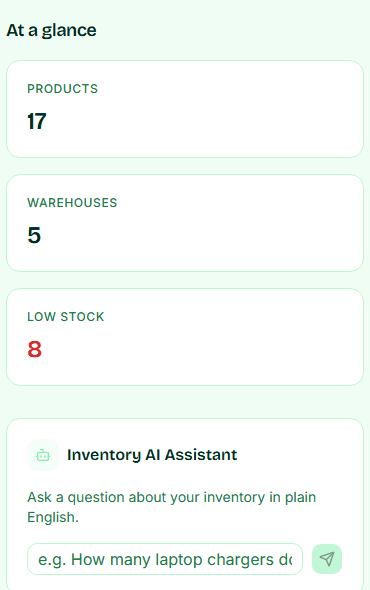
Low-stock SKUs
01 · The operating core
Four surfaces, one set of records.
HR, payroll, finance, and reports read from the same tenant, so the numbers reconcile. The status table later separates what ships today from what is still being built.
01.1 · People
HR, without the spreadsheet.
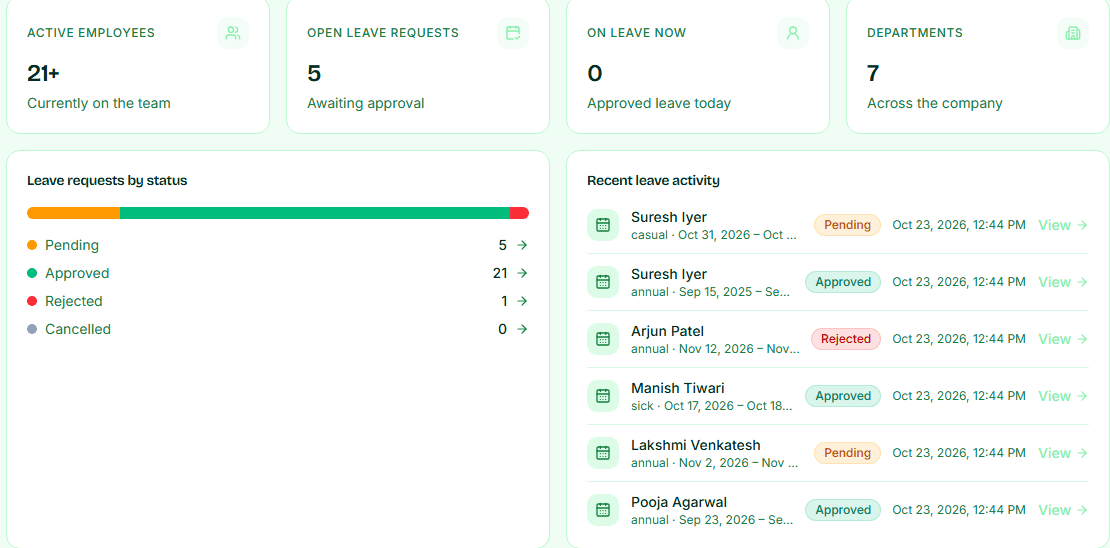
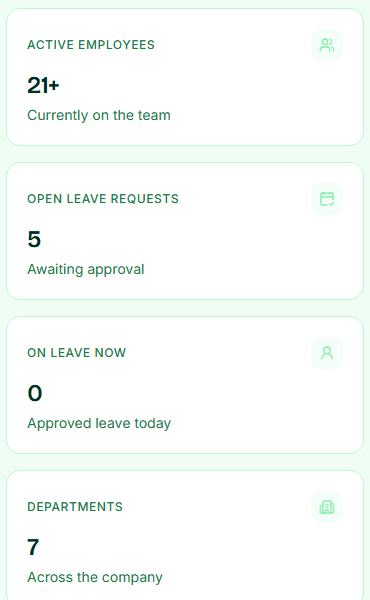
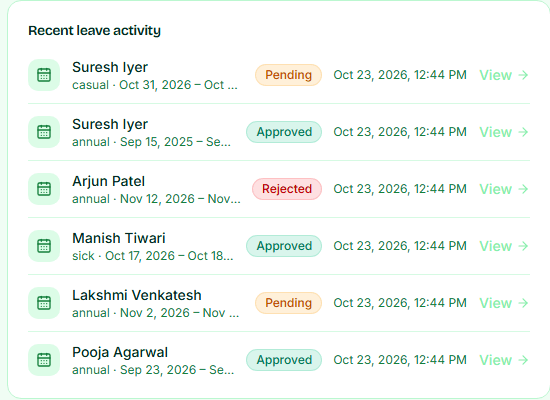
Active employees, departments, leave balances, and the requests waiting on a decision. The workspace has 21 active employees across 7 departments. The request queue shows who is waiting, for how long, and in which department.
- Active
- 21
- Open leave
- 5
- Departments
- 7
01.2 · Payroll
Runs you can audit.
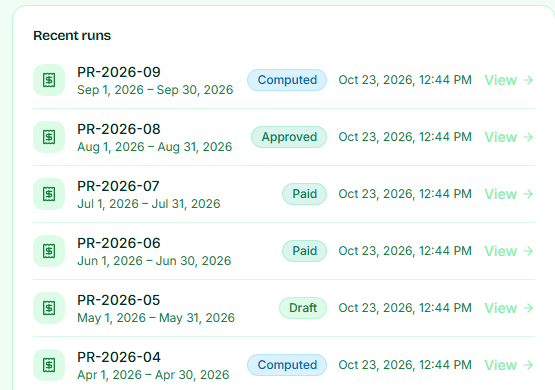
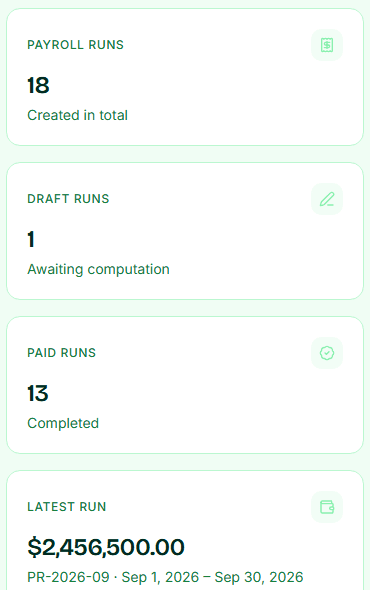
Eighteen runs, thirteen paid, one draft. The latest run is PR-2026-09 for $2,456,500.00. Each run keeps its period and status, so the number has a trail instead of a single total.
- Runs
- 18
- Paid
- 13
- Latest run
- $2,456,500
01.3 · Finance
Revenue history, with the limits stated.
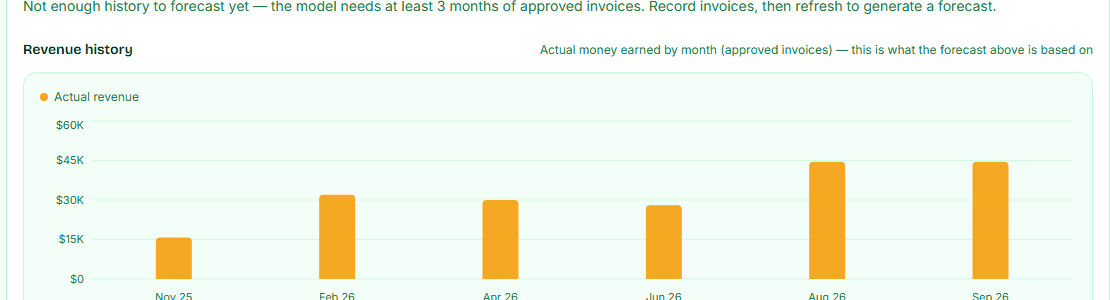
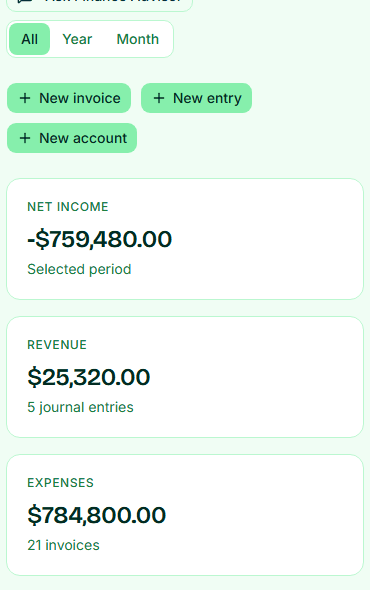
Revenue, expenses, net income, and outstanding invoices on one surface. When there is not enough history to forecast, the product states the limit instead of drawing a line.
- Revenue
- $25,320
- Expenses
- $784,800
- Outstanding
- $377,550
01.4 · Reports
Cross-department answers, built from the same records.
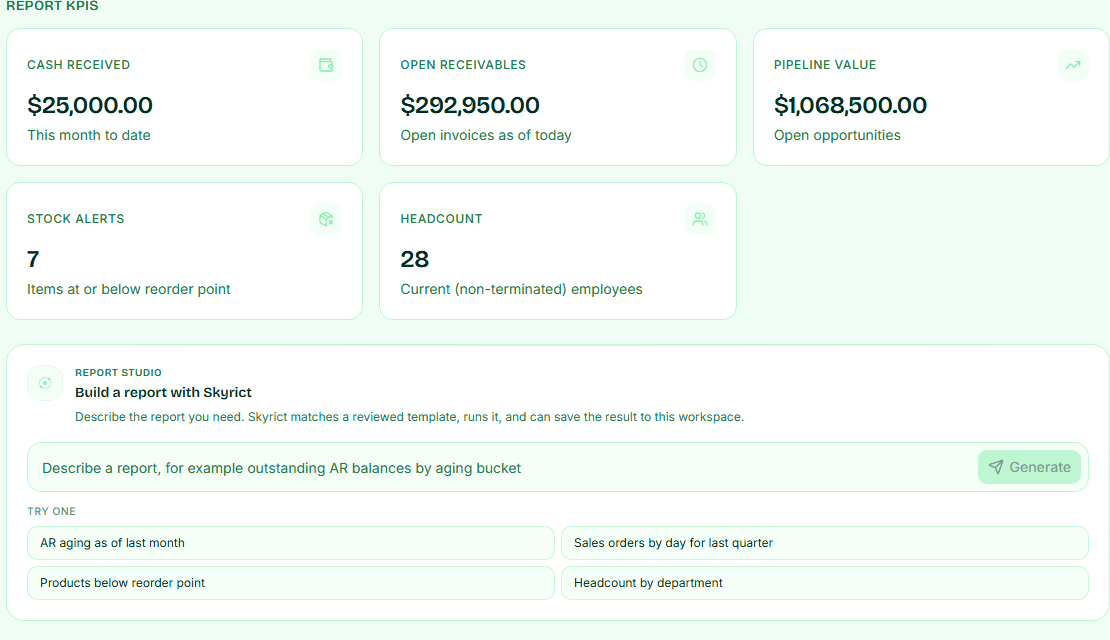
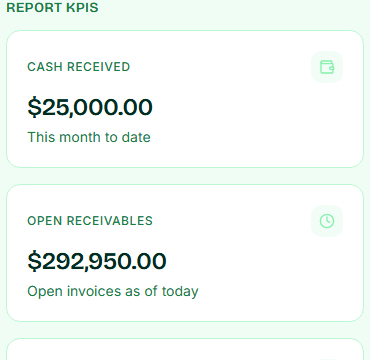
Cash received, open receivables, pipeline value, stock alerts, and headcount on one page. The report studio turns a plain-language request into a reviewed template, so the output has a definition behind it.
- Cash received
- $25,000
- Open receivables
- $292,950
- Headcount
- 28
02 · From signal to work
The system points. The record explains. The agent drafts.
A workspace earns its place when it connects the signal to the next action. These four surfaces come from the same workspace, in the order the work moves.

What needs attention
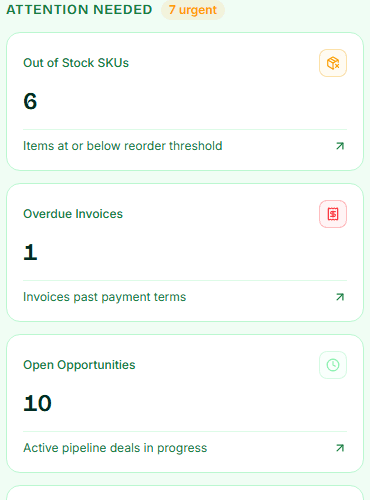
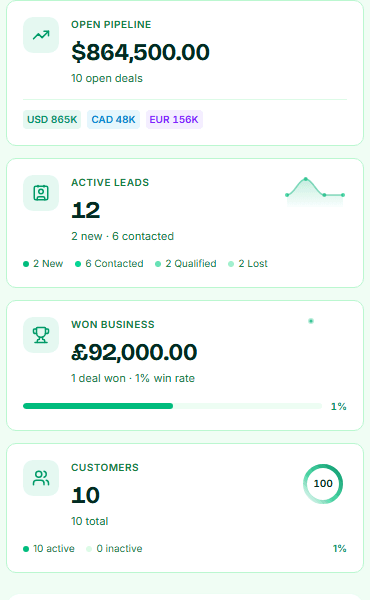
The dashboard attention row counts the work that needs a decision. Six SKUs are out of stock, one invoice is overdue, and ten opportunities are open. Each count links to the records behind it.
Read the pulse docsThe SKUs behind the count
Inventory shows what is on hand, the reorder point, and the shortfall. The list starts with API Gateway Setup, CRM Module Add-on, Analytics Dashboard, and HR Module Add-on. The inventory assistant sits on the same screen, so a question can start from the record instead of a separate tool.
Read the Inventory docs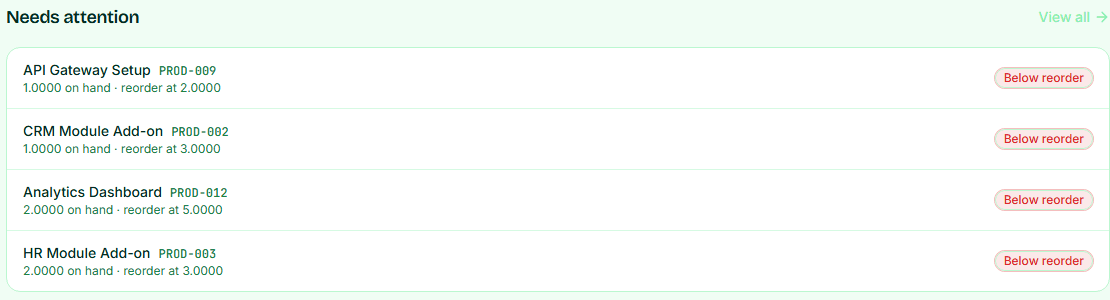
The order and the credit check
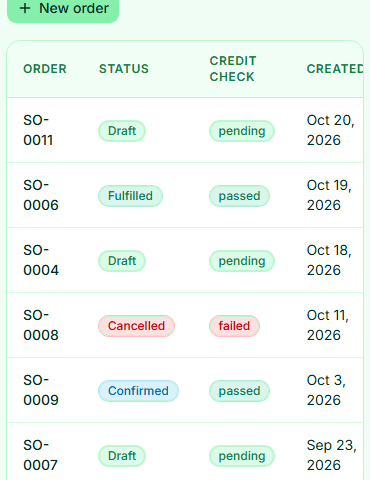
Orders keep the status, the customer's credit check, and the value in the same row. SO-0011 is a $30,800 draft with a pending credit check. Confirmation runs the check before the order moves, while fulfilled, confirmed, and cancelled orders stay visible.
Read the Orders docs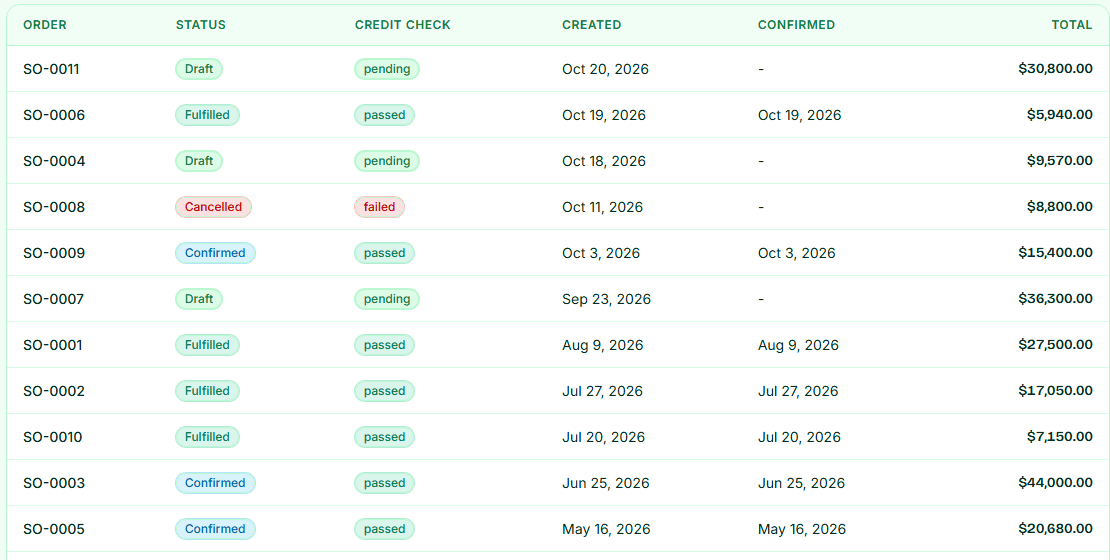
The opportunity and the next step
CRM holds the deal, stage, value, and close date. Zephyr Airlines is a $310,000 opportunity at Negotiation, 70%, closing 17 November 2026. SkyAgent drafts the follow-up from that record, then stops at the approval step.
Read the SkyAgent docs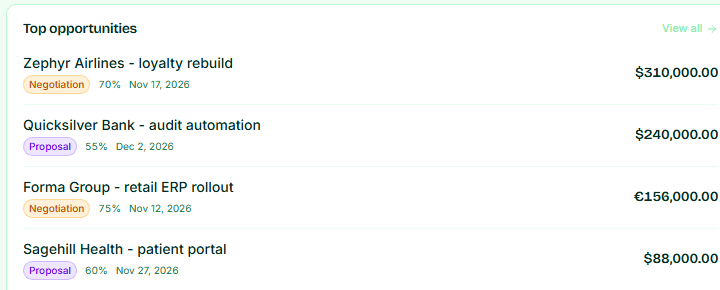
03 · SkyAgent
Ask. Watch it work. Check the records.
Ask across the workspace. SkyAgent reads the Zephyr Airlines opportunity, streams the follow-up, and keeps the records it used attached to the answer.
Reads the workspace
The prompt runs against CRM records, not a pasted export.
Shows the sources
The draft is tied to the opportunity, value, stage, and close date.
Stops at approval
SkyAgent drafts. A person decides what to send.
Draft a concise follow-up email to Zephyr Airlines about the loyalty rebuild opportunity…
SkyAgent is AI and can make mistakes. Please double-check responses.
Prompt: Draft a concise follow-up email to Zephyr Airlines about the loyalty rebuild opportunity. Mention the $310,000 proposal and ask for a decision by 16 November.
CRM Assistant answer: Subject: Zephyr Airlines loyalty rebuild proposal Hi Zephyr team, Following up on the loyalty rebuild opportunity. Our proposal is for $310,000 and covers the full rebuild scope. We would like to confirm a decision by 16 November so we can hold the delivery window. Happy to walk through the plan or adjust the scope before then. Best, Aarav Deshmukh Vastraline Industries
Records used: Zephyr Airlines loyalty rebuild, $310,000, negotiation at 70%, CRM close date 17 November 2026.
SkyAgent drafts the follow-up and stops before sending. The records it used stay attached to the answer.
12
CRM leads
$864,500
Open pipeline
Not sent
Draft status
04 · Status
What ships today. What is still being built.
We would rather show you the empty state than pretend a finished feature exists. This is the current status of the workspace.
Available now
10- Dashboard
- Attention needed, finance and revenue, operations and sales, and report KPIs on one surface.
- CRM
- Leads, opportunities, customers, contacts, activities, and notes, with pipeline stage and value.
- Orders
- Draft, confirm, fulfil, and cancel sales orders. Confirmation runs the customer's credit check.
- Inventory
- Stock levels, warehouses, reorder points, movement, and an inventory assistant.
- HR
- Employees, departments, leave balances, and leave requests with their status.
- Finance
- Cash, invoices, journal entries, and accounting, with the limits of the history stated.
- Payroll
- Runs, compensation, and payroll rules, with each run's period and status.
- Documents
- A central document store. The surface is ready; this workspace has no uploaded documents yet.
- Reports
- Cross-department KPIs, reviewed templates, and exports from the same records.
- SkyAgent
- Ask across the workspace. Answers show the records used, and drafts stop before sending.
In development
04- Market intelligence
- Competitor and trend tracking. The signal collection engine is still being built.
- Sales Coach
- The console loads, but the coaching queue is empty. It is in development and not counted as an available capability.
- Audit Guardian
- The console loads, but the audit queue is empty. The review workflow is still in development.
- Revenue forecasting
- Requires at least three months of approved invoice history. Finance states this in the product instead of drawing a speculative line.
Empty states are part of the product, not a marketing gap. The document store has no uploaded files in this workspace. The coaching and guardian consoles load their queues, but the workflows behind them are still in development. The finance forecast tells you when it needs more approved history.
Built into the account model
Trust is a product surface, not a badge.
Tenant isolation, roles, MFA, and email verification are part of the account model. The source is public, so the defaults can be checked instead of asserted.
Workspace isolation
Each account runs in its own tenant. Records never cross workspaces.
Roles and permissions
Owner, admin, and member roles, with custom roles built from a fixed permission menu.
Multi-factor authentication
TOTP support with one-time backup codes.
Open source
The codebase is public, so the security model can be checked.
What is Skyrict?
Skyrict is a scoped ERP with an AI agent workspace on top. It brings inventory, sales, cash, orders, CRM, and people into one system, and SkyAgent answers questions from those records.
How is this different from a dashboard?
A dashboard shows what happened. Skyrict holds the records and lets you ask questions across them in plain language. SkyAgent can point to the records and sources behind an answer so you can check it before you act.
Do I have to replace my ERP?
Skyrict is its own scoped ERP, not a connector for an existing one. You start with the modules you need instead of a full 400-module rollout. If you already run an ERP, talk to us about what you need to bring across.
What does Skyrict cover?
The modules are inventory, orders, sales, finance, CRM, HR, payroll, documents, approvals, and reporting. Market signals are in development: the signal collection engine is planned, and the intelligence workspace is in progress.
How is my data protected?
Every workspace is tenant-scoped, with role-based permissions, MFA, and email verification. The security model is documented in the open, and the source is public.
How do I get started?
Starter is free forever. Paid plans begin with a 14-day trial, no credit card required. Create an account, set up your workspace, and ask SkyAgent your first question. For a guided rollout, Open a demo account.
See it with your records
Bring one workflow. See the whole system.
Create a workspace, add a few records, and ask SkyAgent what needs attention. The answer comes with the records behind it.
- Free to start
- No card required
- 14-day trial